
So I’ve been fixing a problem of enter transitions being sometimes skipped in my React Promise Modal library — I’ve covered the library in my previous posts.
The problem
The idea behind the library is to make it super easy to implement and spawn modals while having transitions supported out of the box. The API for making your modals appear and disappear in style is absolutely straightforward.
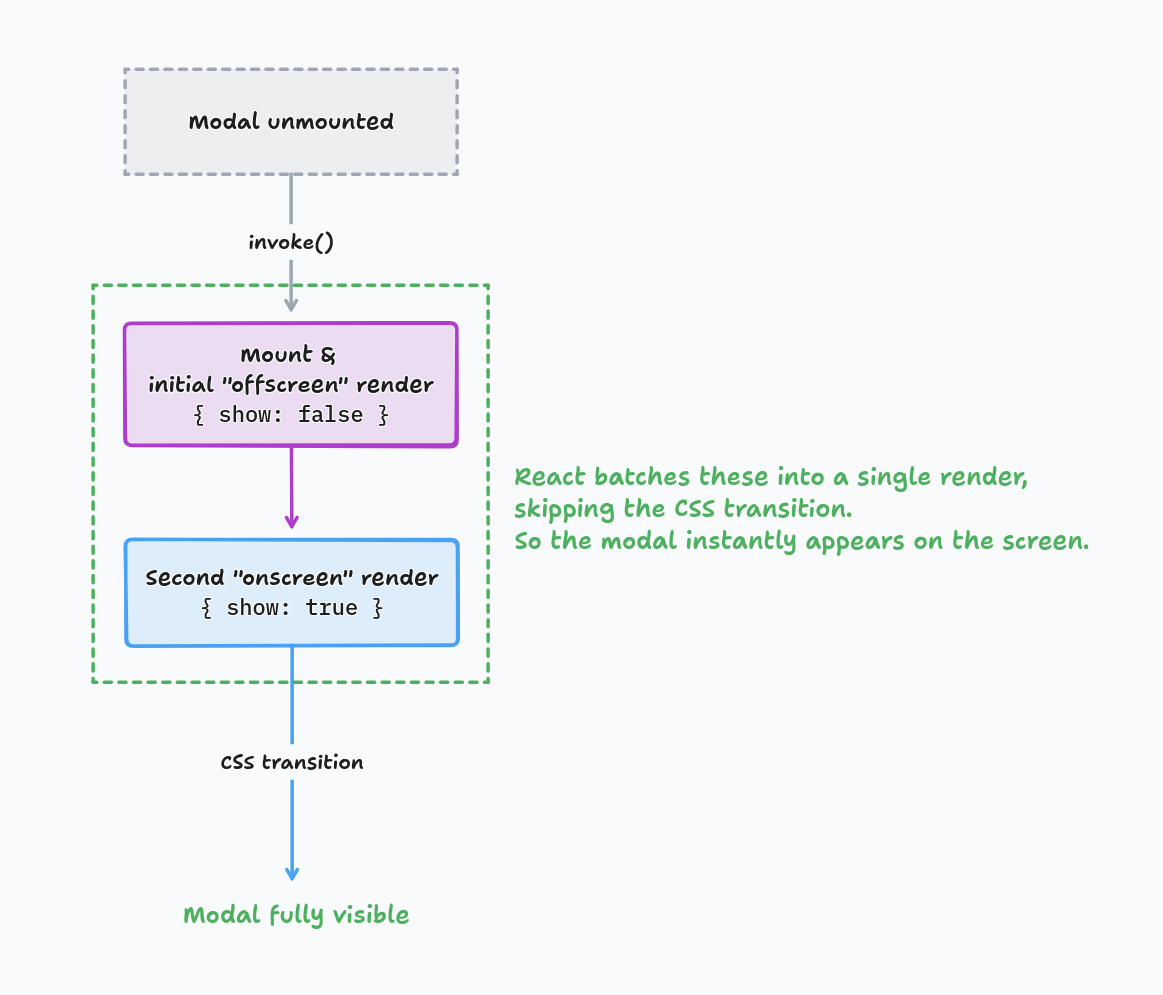
For this, every time a modal has to appear the library first renders it “offscreen”
(with the show flag set to false) — letting the DOM fully render and be present in the document.
Right after that the second render happens with show: true — and that’s where the CSS transitions
do the actual visual animation, animating it from A → B.
The tricky part is to make sure that the initial “offscreen” render really happens. If it’s skipped, there is no A → B, and it just appears in the final B state.
Since React 18 createRoot change, React started to automatically batch multiple consequent
state changes into a single render — that’s when the old implementation has stopped working completely.
What doesn’t work
My initial workaround ideas were:
- Adding a
setTimeoutdelay before switching to the next stage withsetStage()state setter. - Triggering the next
setStage()switch from withing auseEffect()after the previous stage has been “rendered”. - Same as above, but using
useLayoutEffect().
Relying on useEffect() did not work, as it runs before paint for interaction-caused updates.
And useLayoutEffect() runs after React commits the DOM, but before the browser repaints it.
State updates triggered from useLayoutEffect() are processed before the repaint as well.
So none of it worked. React would still swallow a render seeing more state changes queued in the pipeline. Which is actually a good thing. But we have to find another solution.
The solution
The real solution was to rely on the browser’s requestAnimationFrame() API —
as it is exactly designed to execute arbitrary code in a separate animation frame,
making sure the previous frame rendering had been already finished and fully painted on screen.
This simple useNextFrameEffect() hook combines the useEffect() semantics with the requestAnimationFrame() API,
providing an easy-to-use abstraction:
type CleanupFn = () => void;

export function useNextFrameEffect(
    callback: () => CleanupFn,
    deps: unknown[],
): void {
    const freshCallback = useEffectEvent(callback);

    useEffect(() => {
        let cleanup = noop;
        const frame = requestAnimationFrame(() => {
            cleanup = freshCallback();
        });

        return () => {
            cancelAnimationFrame(frame);
            cleanup();
        };
    }, deps);
}
And then you can use it to implement the next-step state switch in an effect:
useNextFrameEffect(() => {
    if (stage === Stage.MOUNTED) {
        setState(Stage.OPENING);
    }
    // ...
}, [stage]);
Have you encountered a similar problem? Let me know via social networks or on LinkedIn.
Cheers! 🖖